Description:
Below error occurs while accessing, Oracle Clinical
Maintain Discrepancy Database for a Study screen.
13761: Current form cannot be executed without current profile context.
Solution:
Lack of "RXC_DMGR" role the above error occurrs. Grant RXC_DMGR role to the user solves the issue.
Step 1: Login as SYS
Step 2: GRANT RXC_DMGR TO OPS$USERNAME;
Thursday, February 25, 2010

Script to Delete Trace Files
Description:
Below script can be used to delete trace files older than 15 days.
Script:
#/usr/bin/sh!
TRACE_TOKEEP=15
TDUMP_DIR=
find $TDUMP_DIR -name "*.trc" -mtime +$TRACE_TOKEEP -exec rm -f {} \;
Below script can be used to delete trace files older than 15 days.
Script:
#/usr/bin/sh!
TRACE_TOKEEP=15
TDUMP_DIR=
find $TDUMP_DIR -name "*.trc" -mtime +$TRACE_TOKEEP -exec rm -f {} \;
Tuesday, February 23, 2010
ORA-01950: no privileges on tablespace 'USERS'
Description:
User faced ORA-01950: no privileges on tablespace 'USERS' error.
Solution:
I granted below privilege to the user to avoid ORA-1950 Error.
ALTER USER USERNAME QUOTA UNLIMITED ON USERS;
User faced ORA-01950: no privileges on tablespace 'USERS' error.
Solution:
I granted below privilege to the user to avoid ORA-1950 Error.
ALTER USER USERNAME QUOTA UNLIMITED ON USERS;
Friday, February 19, 2010
How to change Archive Log Destination
Description:
I used below steps to change Archivelog destination for Oracle 10g.
Step 1: Login to Database as SYSDBA
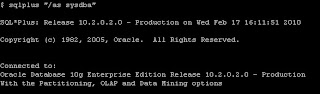
Step 2: Check the Archive Destination using archive log list command.

Step 3: Set the value of db_recovery_file_dest Parameter.

Step 4: Set the value for db_recovery_file_dest_size Parameter

Step 5: Check the new location for Archivelog destination

Step 6: Use the below command to generate Archivelog.

Step 7: Use the below command to check Archive Destination and log sequence.
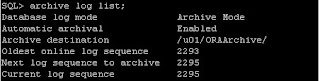
I used below steps to change Archivelog destination for Oracle 10g.
Step 1: Login to Database as SYSDBA

Step 2: Check the Archive Destination using archive log list command.

Step 3: Set the value of db_recovery_file_dest Parameter.

Step 4: Set the value for db_recovery_file_dest_size Parameter

Step 5: Check the new location for Archivelog destination

Step 6: Use the below command to generate Archivelog.

Step 7: Use the below command to check Archive Destination and log sequence.

Tuesday, February 16, 2010
Change Database from NoArchivelog to Archivelog Mode
Description:
I used the below steps to change Archivelog mode.
Step 1: To check Database Mode

Step 2: Shutdown the database:

Step 3: Start the Database using mount stage
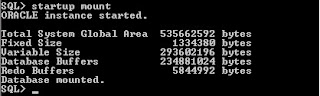
Step 4: Change the Database to archivelog mode.
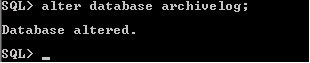
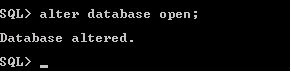
Step 5: Open the Database:
Step 6: To check the Database Mode

I used the below steps to change Archivelog mode.
Step 1: To check Database Mode

Step 2: Shutdown the database:

Step 3: Start the Database using mount stage

Step 4: Change the Database to archivelog mode.

Step 5: Open the Database:

Step 6: To check the Database Mode

Monday, February 15, 2010
Script to Rebuild Indexes
Description:
Shell Script to Rebuild the Indexes
#### Script Starts Here ####
#!/bin/sh
. .profile
# Print Start Time
startTime=`date`
echo
echo "Starting Time $startTime"
rebuild1=/tmp/rebuild.tmp
sqlplus -s system/manager << ! > $rebuild1
set pagesize 0
set feedback off
SELECT 'ALTER INDEX '||owner||'.'||index_name||' REBUILD TABLESPACE '||tablespace_name||' ONLINE;'
FROM DBA_INDEXES
where owner not in ('SYSTEM','SYS');
!
sqlplus -s system/manager << !
set feedback off
set pagesize 0
set echo on
set time on
set timing on
@$rebuild1
exit
!
# Print End Time
endTime=`date`
echo
echo "Rebuild Schema Successfully Completed"
echo "Ending Time $endTime"
#### Script Ends Here ####
Shell Script to Rebuild the Indexes
#### Script Starts Here ####
#!/bin/sh
. .profile
# Print Start Time
startTime=`date`
echo
echo "Starting Time $startTime"
rebuild1=/tmp/rebuild.tmp
sqlplus -s system/manager << ! > $rebuild1
set pagesize 0
set feedback off
SELECT 'ALTER INDEX '||owner||'.'||index_name||' REBUILD TABLESPACE '||tablespace_name||' ONLINE;'
FROM DBA_INDEXES
where owner not in ('SYSTEM','SYS');
!
sqlplus -s system/manager << !
set feedback off
set pagesize 0
set echo on
set time on
set timing on
@$rebuild1
exit
!
# Print End Time
endTime=`date`
echo
echo "Rebuild Schema Successfully Completed"
echo "Ending Time $endTime"
#### Script Ends Here ####
Tuesday, December 29, 2009
How to enable trace for a Session?
Use the below steps to trace the Sessions.
Step 1: Login as sysdba
$sqlplus “/as sysdba”
Step 2: Execute the below query to get sid and serial#
SQL> select sid, serial# FROM v$session where username = 'USER_NAME';
Step 3: Enable trace Session using the below
SQL>exec dbms_system.set_sql_trace_in_session(sid,serial#,TRUE)
e.g: SQL> exec dbms_system.set_sql_trace_in_session(100,2018,TRUE)
Step 4: Check the trace files from user_dump directory.
SQL> select value from v$parameter where name = 'user_dump_dest';
Step 5: Check the trace (.trc) files from user_dump_dest directory.
Step 6: Disable trace session using the below
SQL>exec dbms_system.set_sql_trace_in_session(sid,serial#,FALSE)
e.g: SQL> exec dbms_system.set_sql_trace_in_session(100,2018,FALSE)
Step 1: Login as sysdba
$sqlplus “/as sysdba”
Step 2: Execute the below query to get sid and serial#
SQL> select sid, serial# FROM v$session where username = 'USER_NAME';
Step 3: Enable trace Session using the below
SQL>exec dbms_system.set_sql_trace_in_session(sid,serial#,TRUE)
e.g: SQL> exec dbms_system.set_sql_trace_in_session(100,2018,TRUE)
Step 4: Check the trace files from user_dump directory.
SQL> select value from v$parameter where name = 'user_dump_dest';
Step 5: Check the trace (.trc) files from user_dump_dest directory.
Step 6: Disable trace session using the below
SQL>exec dbms_system.set_sql_trace_in_session(sid,serial#,FALSE)
e.g: SQL> exec dbms_system.set_sql_trace_in_session(100,2018,FALSE)
Subscribe to:
Posts (Atom)